
 ACL Customer Success Stories (1.2 CPE)

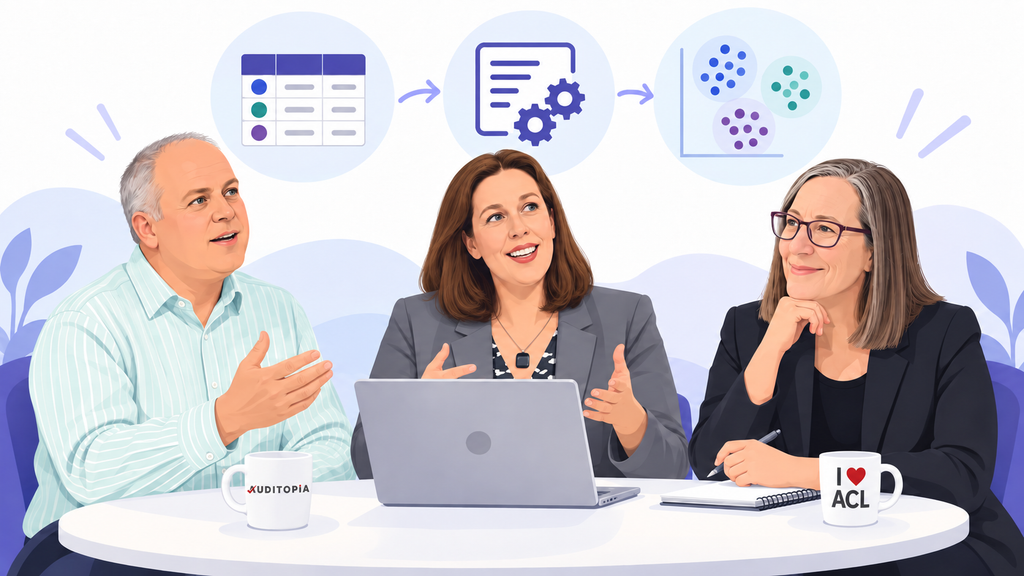
I participated in an Auditopia panel on how experienced users are using ACL Analytics. Laura Sangree, Manager of Analytics & Process Improvement at American Greetings, joined me on the panel. Laura has a background in software development and financial applications and now works in internal audit, using ACL to bring together data from systems such as SAP, Snowflake, and other enterprise platforms.
Paul Chaney, CEO of Auditopia and KOINO IT Solutions, moderated the discussion. Paul has been working in audit and analytics for decades, including at Southwest Airlines, FedEx, and Walmart, and has more than 35 years of experience using ACL.
It was a trio of “Experienced Users,” indeed! Here in this post, I’m expanding on some of the topics we covered since it was a short, 30-minute session.
Sometimes the Simple Analytics Tell You the Most
We talked about ACL commands, scripting, automation, and machine learning. When asked which ACL capabilities have had the biggest impact on how I work, I went back to something much simpler.
CLASSIFY – The CLASSIFY command lets you get into the data and understand what is actually there before you start deciding what it means. It allows you to identify the categories present in your data, quantify them a bit, and validate your assumptions before you start.
For example, say you’re analyzing employee expenses and trying to identify unusually high transactions. You could run STATISTICS or OUTLIERS across the entire population. But a $500 hotel expense is very different from a $500 meal.

So, maybe you decide to focus specifically on meals. You create a filter for expense_category = "MEALS" and start your analysis. You run STATISTICS across the filtered expenses, analyze the results, and write your conclusions about the unusually high meals expense transactions. That sounds reasonable.
But you may have missed something. Before you filtered the data, did you check what expense categories actually exist? Taking a step back, you run CLASSIFY ON expense_category SUBTOTAL exp_amt TO "t_ExpSummary" and you find
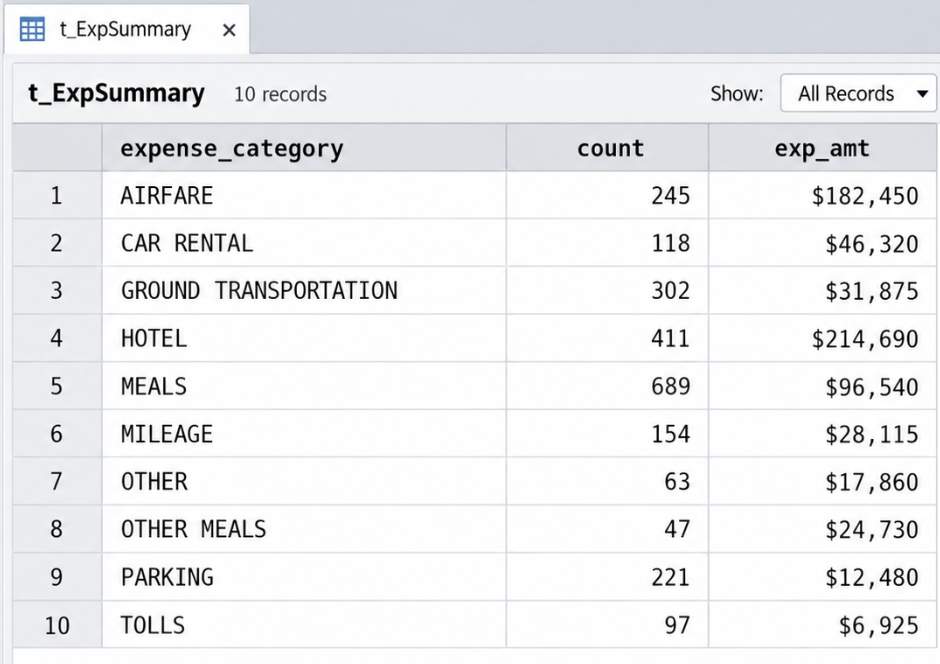
Wait, what’s OTHER MEALS?
Maybe it’s completely legitimate. Perhaps it was created for corporate-sponsored meals, retirement parties, or some other type of expense clearly defined within your company’s expense policy. But maybe it isn’t. Maybe someone knows that the organization’s continuous monitoring looks for expense_category = MEALS, and questionable expenses have found their way into OTHER MEALS instead. You don’t know yet.
But now you know the category exists. You can adjust your test to include this additional category, perhaps by changing your filter to FIND("MEALS", expense_category). Or you can expand your analytics to look at all categories, with the OUTLIERS AVERAGE PKEY expense_category ON exp_amt NUMSTDEV 3 TO "t_ExpenseOutlierResults".
One more CLASSIFY Example
This type of category analysis is also important when we are looking at medical transaction data. Say we have a population of medical billings, with fields such as provider_id, billed_amt, provider_type, and service_date.
We could run STATISTICS or OUTLIERS across billed_amt, but that may not tell us very much if we are mixing very different types of providers together. A hospital, physician, nurse practitioner, oncologist, and acupuncturist may all have very different billing patterns.
CLASSIFY on provider_type gives us a better picture of the population. From there, we can analyze within the categories. Are there individual nurse practitioners whose billing is unusually high compared with other nurse practitioners? Are there hospitals that stand out from other hospitals?
But we should also compare across the categories.
I’ve seen a nurse practitioner who consistently billed more on average than MDs in the same geographic region. I’ve also seen an acupuncturist whose total billed amount for the year exceeded the total billed amount of each of the top 25 hospitals in California. Those comparisons raise a different set of questions than simply finding an outlier within a provider category.
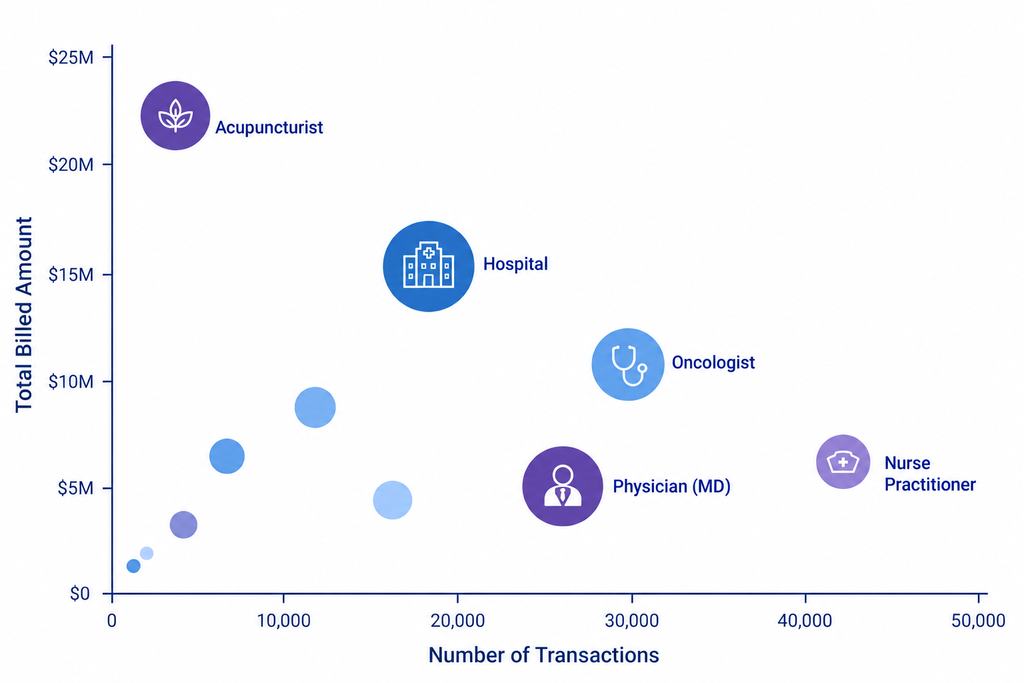
Again, CLASSIFY isn’t telling us that something is wrong. It is helping us understand the population from multiple perspectives and identify where we may want to look more closely.
Design Automation for the Unexpected
Laura provided some insightful automation advice. She described a situation where someone might tell her that a field will only ever contain three transaction codes. Rather than build the script around that assumption, she uses GROUP BY logic that handles the three expected values and then sends everything else to an exception category. That way, when a new transaction code eventually appears, it does not quietly fall outside the analysis. The exception category gives you a way to see when reality stops matching the assumptions built into the script. That is often just as important as processing the expected transactions correctly.
Laura also talked about how her team uses ACL as part of a much larger process. They work with data coming from SAP, Snowflake, legacy systems, text files, and delimited files, and use ACL to import, combine, and compare information across those sources. A lot of that work supports controls over completeness and accuracy, especially when data moves between systems. That moves ACL beyond one-time analysis. It becomes part of a repeatable control process where the same logic can be applied again and again to make sure the data moved correctly and that the results still make sense.
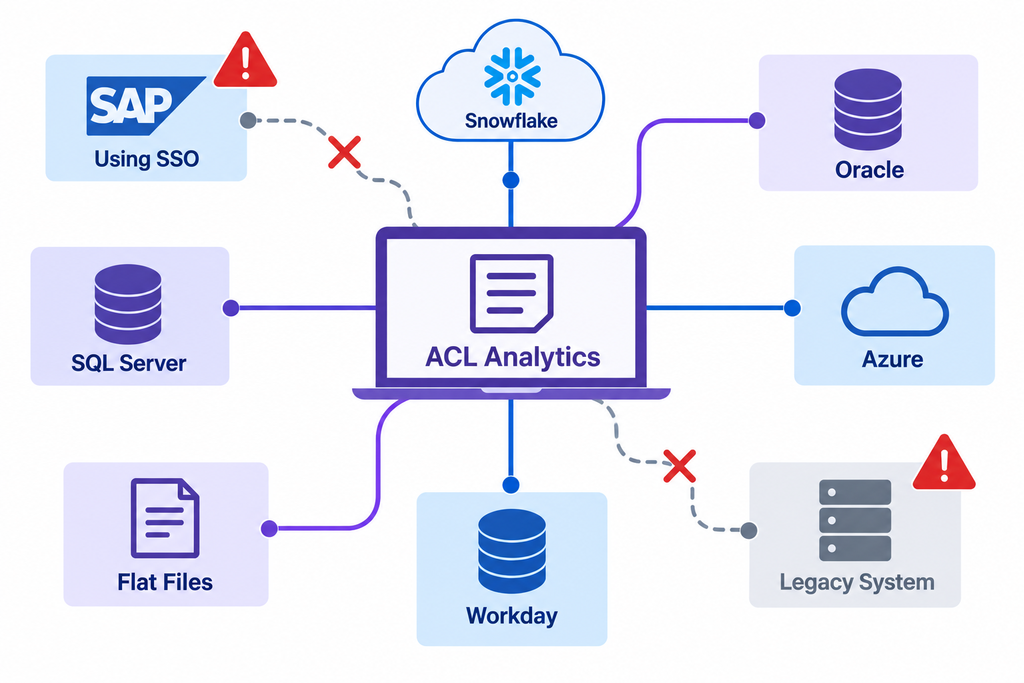
Of course, repeatable does not mean static. Laura made the point that the scripts themselves may be stable while the surrounding environment keeps changing. A vendor may change how a system such as Snowflake is accessed. Internal IT may introduce new security requirements. Connections, exclusions, or access paths may need to be updated even if the underlying analytic logic has not changed at all. That is an important part of maintaining automated analytics over time. You do not just write the script and walk away. You have to keep paying attention to the systems, controls, and assumptions around it.
Dip Your Toe Into Machine Learning
Whether you are a beginning ACL user or an advanced one, I would encourage you to try the machine learning commands that are already available in ACL Analytics. You do not have to start with a complicated model. Start by understanding what TRAIN, PREDICT, and CLUSTER actually do, then try them on a data set you already know well.
TRAIN and PREDICT are examples of supervised machine learning. Supervised means that you start with historical data where you already know the outcome. You have records that have already been investigated, reviewed, or otherwise classified, and you use those known results to teach the model what to look for. TRAIN uses those labeled examples and the characteristics you provide to build the model. PREDICT then applies what was learned to a new population where the outcome is not yet known.
If you have examples of past verified audit exceptions, hotline complaints, or investigations, you can tag those as confirmed exceptions and use them as part of your training data. For example, say you are analyzing sales data for unusually high discounts or excessive free product provided by the sales team, and you have past cases where sample abuse was confirmed. You can identify characteristics such as the percentage of free samples, account revenue, and shipment frequency and use those features to TRAIN the model. If you have a year of historical data that includes both those tagged exceptions and the rest of the transaction population, that becomes your training file.
Now, as the new quarter is getting ready to close, you can use PREDICT against the current quarter’s data to identify transactions with characteristics similar to the historical exceptions. They are not fraud findings, but they may point you toward unusual discounts, excessive free product, or accounts that deserve a closer look before the quarter is closed. Catching those issues earlier can have a real financial impact by reducing revenue and margin leakage and giving the organization a chance to address the activity before it continues into the next quarter.
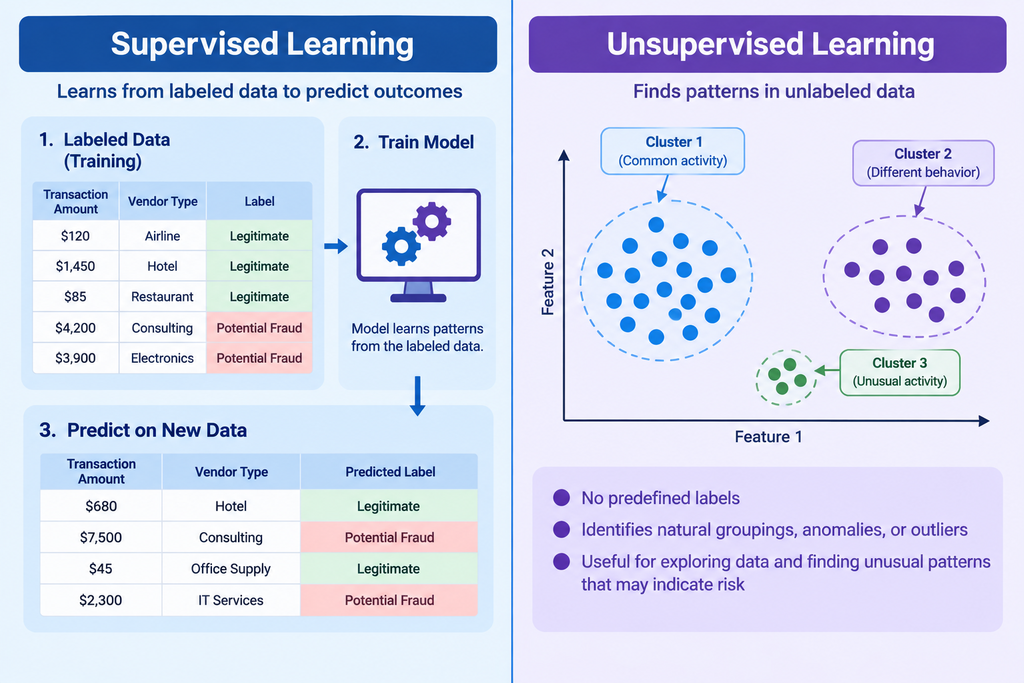
CLUSTER gives you a different way to use machine learning. It is an example of unsupervised machine learning, which means you do not start with records that have already been labeled as good or bad. Instead, you select the features you want the model to consider, and ACL uses k-means clustering to group records that have similar characteristics. From there, you can look at the clusters themselves and ask whether any small or unusual groups stand out. You can also look at how far individual records are from the center of their cluster. A small cluster does not mean fraud, and a record far from the center of a cluster does not mean fraud. It tells you that something is different enough to be worth understanding.
Try these commands. Then take the next step and learn what “k-means clustering” actually means, how the model groups records, and why a record might stand out. If you are going to use machine learning to identify exceptions, you should be able to explain to management or other stakeholders how those exceptions were identified and what the result actually means. Then try another machine learning method and keep leveling up your work. This can be especially valuable when your traditional rules-based analytics are no longer finding the kinds of exceptions or patterns you need to identify. Machine learning gives you another way to look at the data when you do not already know the exact rule you should be testing for.
Keep Expanding What Your Analytics Can Do
The progression does not have to be complicated. Start with CLASSIFY to understand what is actually in your data. Build scripts that account for the unexpected. Use automation to make good analytics repeatable. Then experiment with machine learning when traditional rules are not finding what you need.
The important part is not simply using a more advanced command. It is understanding why you are using it, what assumptions are built into it, and what the result actually means. Whether the exception came from a CLASSIFY, an OUTLIERS test, a GROUP BY exception, or a machine learning model, you still need to be able to explain why it deserves attention.
And keep trying new things. Start with the analytics you already understand, add another technique, learn what it is doing, and then decide whether it helps you see something in the data that you could not see before.
For more musings on applying data analytics techniques, check out my website: https://nextstepdatainsights.com/blog/
Responses